





Sign in

Start your 7-day free trial.

Bring a folder of raw footage. Get back a cut you can post or finish in Premiere.

Free for 7 days, then $100 a month. Cancel anytime. Mac app, needs Apple Silicon (M1 or later).

One quick question

Do you have a Mac with Apple Silicon?

Wideframe runs on Macs with an M1 chip or newer.

Not sure? On your Mac, open the Apple menu and choose About This Mac. A chip name that starts with M means yes.

You're in,

When will you next be editing on your Mac?

  • NowWe're emailing your trial link.
  • ThenWe'll send a reminder at the time you pick, so it is at the top of your inbox.

You're on the waitlist.

We'll email when Wideframe runs on your computer.

Which computer do you edit on?

Open it on your Mac.

  1. Open the email on your Mac, or send yourself the link.
  2. Add a card and download Wideframe. Nothing is charged today.
  3. Bring a folder of footage and ask for the cut.

No email after a minute? Check spam, or open try.wideframe.com/onboarding on your Mac.

Start your 7-day free trial

  1. TodayFull access to Wideframe. $0 due.
  2. Day 7$100/month starts. Cancel before then and you pay nothing.

Card details are encrypted and handled by Stripe.

Cancel anytime in the app or by emailing support@wideframe.com.

Welcome back

Reactivate Wideframe for $100/month. To request another free trial, email support@wideframe.com.

Billed $100/month starting today. Cancel anytime.

Not on an Apple Silicon Mac?

Wideframe runs on Macs with Apple Silicon today. Join the waitlist for your computer.

Welcome back

Enter your email to pick up where you left off.

New to Wideframe? Start a 7-day free trial

You're in.

Download Wideframe for Mac
  1. Open the download and install Wideframe.
  2. Sign in with the email you used here.
  3. Point it at a folder of footage and tell it what to do.

Need a hand? support@wideframe.com

Demo

Your footage

+38

44 clips · 5 min 35 s of footage

  • Analyzing the footage

    Watched all 44 clips. Transcribed 16 to camera.

  • Creating the beats
    HookFamily of sixDay montageEgg slideVerdictLogo
  • Creating the animations

    Captions, four big-word cards, logo card.

  • Here is the final

    30 seconds, 9:16, ready for TikTok and Reels.

Final cut
Made in Wideframe From the 44 clips above.

Free for 7 days · Mac app

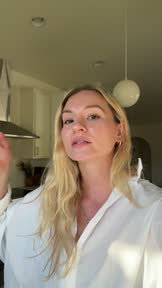
“I was blown away at how it analyzed the footage, told me what scenes were missing from the producer’s initial shot list, and even what scenes only had one-camera coverage versus two.”
Dylan TubaTuba Time Creative
“Where it was the most useful was just saying something like, ‘I need a sound bite from Andy, and I need it to be emotional.’ In those moments, it was pretty helpful.”
Bryan MirDirector, Make Believe Pictures
“I have at least 10 long-form art classes I had banked, and this product is going to make it possible for me to finally launch these.”
Luz DonahueWideframe customer

Tell your assistant editor what to do

Pick a job to see what comes back.

Find every time Andy talks about leaving his old job.
  • Searching 3 interview transcripts
  • Adding markers

Found 9 moments across 3 interviews

Marked in the interview sequence.

Start 7-day free trial

What Wideframe does on your Mac

Prep Premiere projects from raw footage

Drop in a shoot. Get back a Premiere project with synced cameras and organized bins, linked to your original media.

Holiday shootProject
Filesinterview_stringout
Holiday shootAll files
Name KindLengthDate modified
source186
FolderToday
A_CAM74
FolderToday
B_CAM68
FolderToday
DRONE31
FolderToday
AUDIO13
FolderToday
premiere1
FolderToday
holiday_shoot.prproj
Premiere projectToday
shot_log.md
MarkdownToday
2 folders · 188 items
Get the holiday shoot ready to cut in Premiere.
Worked for 7m 20s · 4 steps
  • Watched 186 clips (5h 40m)
  • Transcribed 7 interviews
  • Synced A and B cams to the lav
  • Wrote holiday_shoot.prproj

Ready to cut: bins, 7 multicams and an interview string-out, linked to your original media. Open holiday_shoot.prproj in Premiere.

Add a bin of the best drone shots
SkillsHoliday shoot

Pull selects and build string-outs

Describe the piece and get the selects laid out as a string-out you can watch in one pass.

Andy profileProject
Filesandy_profile_interviewsandy_profile_selects
andy_profile_selects11:40 · 3840×2160 · 23.976Comments 0Share
0:05:08:03/ 0:11:40:00
Comment
SetupThe leapThe hard yearWhere he is now
0:002:004:006:008:0010:00
V1
A1
ANDY_LAV.WAV
Pull the emotional soundbites from Andy’s interview and string them out in story order.
Worked for 1m 06s · 3 steps
  • Read 2h 04m of transcript
  • Scored 61 candidate soundbites
  • Assembled andy_profile_selects

23 selects, 11m 40s, ordered as setup, the leap, the hard year and where he is now. Each section starts with a marker. Open andy_profile_selects.prproj in Premiere.

Now cut a 90-second version for the trailer
SkillsAndy profile

Turn each episode into clips

Find the moments worth clipping, reframe them for vertical and caption them in your style.

PodcastProject
Filesep42_clip03ep42_clip04
ep42_clip030:51 · 1080×1920 · 29.97Comments 2Share
0:00:18:04/ 0:00:51:00
Comment
Hook lands hereSame captions as episode 41
0:000:100:200:300:400:50
V1
ep42_fullep42_fullep42_fullend_card
A1
ep42_fullend_card_sting
/social-clips episode 42, six clips in our podcast format
Worked for 3m 40s · 3 steps
  • Ran the social-clips skill
  • Found 6 moments in 58 min of conversation
  • Reframed to 9:16 and added captions

6 clips ready, with the same caption style and end card as episode 41. Sequences are in ep42_clips.prproj, renders in exports.

Make square versions for LinkedIn too
SkillsPodcast

How the free trial works

  1. Enter your emailOn your phone right now? We email you a link to open on your Mac, where Wideframe runs.
  2. Add a card on your Mac and download WideframeNothing is charged today. You get full access for 7 days. Needs Apple Silicon (M1 or later).
  3. Keep it or cancelAfter 7 days Wideframe is $100 a month. Cancel in the app or by email before then and you pay nothing.

Questions

What do I need to run it?

A Mac with Apple Silicon (M1 or later). Wideframe analyzes your footage in the cloud to transcribe it and describe each shot. Your original files stay on your drives, and the projects it writes link back to them.

I’m on my phone. Can I start now?

Yes. Enter your email and we send you a link. Open it on your Mac to add your card and start the trial. Wideframe itself runs on a Mac with Apple Silicon, not on a phone.

What does the free trial include, and when am I charged?

Full access for 7 days. Your card is saved when the trial starts and nothing is charged today. The first $100 charge happens when the trial ends. Cancel before then and you pay nothing.

How do I cancel?

With the Wideframe app open, go to Account > Billing in the Mac menu bar, or email support@wideframe.com. Cancellation takes effect right away and stops the next bill.

Does Wideframe replace Premiere Pro?

No. Wideframe writes Premiere Pro projects (.prproj) with your original media linked. You open them in Premiere and do the creative edit, color and export the way you always have.

How is Wideframe different from AI video generators like Sora or Runway?

Video generators make new footage from a prompt. Wideframe works on the footage you already shot. It watches every clip and hands you bins, selects and Premiere Pro sequences built from your own media.

Edit video faster with Wideframe for Mac

7 days free, then $100 a month. Cancel anytime.

Start free trial
Start free trial
$0 today, then $100 a month. Mac app.